<?xml version="1.0" encoding="utf-8"?><feed xmlns="http://www.w3.org/2005/Atom" ><generator uri="https://jekyllrb.com/" version="3.10.0">Jekyll</generator><link href="https://kymadogg.github.io/feed.xml" rel="self" type="application/atom+xml" /><link href="https://kymadogg.github.io/" rel="alternate" type="text/html" /><updated>2026-10-08T17:46:04+00:00</updated><id>https://kymadogg.github.io/feed.xml</id><title type="html">K Herbstzuber</title><subtitle>K Herbstzuber&apos;s blog + project portfolio site. </subtitle><author><name>K Herbstzuber</name></author><entry><title type="html">Flatland</title><link href="https://kymadogg.github.io/flatland/" rel="alternate" type="text/html" title="Flatland" /><published>2026-10-08T00:00:00+00:00</published><updated>2026-10-08T00:00:00+00:00</updated><id>https://kymadogg.github.io/flatland</id><content type="html" xml:base="https://kymadogg.github.io/flatland/"><![CDATA[<div class="post-meta-bar">
  
<a class="github-repo-link" href="kymadogg/flatland">
  <i class="fab fa-github" aria-hidden="true"></i>
  kymadogg/flatland
</a>


<div class="post-rating" aria-label="1 out of 5">
  
    <a href="/misc/?rating=1#caffine-rating" class="rating-link" aria-label="Rate 1 stars">
      <img src="/assets/images/wm_can.png" alt="" class="" />
    </a>
  
    <a href="/misc/?rating=2#caffine-rating" class="rating-link" aria-label="Rate 2 stars">
      <img src="/assets/images/wm_can.png" alt="" class="rating-empty" />
    </a>
  
    <a href="/misc/?rating=3#caffine-rating" class="rating-link" aria-label="Rate 3 stars">
      <img src="/assets/images/wm_can.png" alt="" class="rating-empty" />
    </a>
  
    <a href="/misc/?rating=4#caffine-rating" class="rating-link" aria-label="Rate 4 stars">
      <img src="/assets/images/wm_can.png" alt="" class="rating-empty" />
    </a>
  
    <a href="/misc/?rating=5#caffine-rating" class="rating-link" aria-label="Rate 5 stars">
      <img src="/assets/images/wm_can.png" alt="" class="rating-empty" />
    </a>
  
</div>
</div>

<script type="module">
	import mermaid from 'https://cdn.jsdelivr.net/npm/mermaid@10/dist/mermaid.esm.min.mjs';
	mermaid.initialize({
		startOnLoad: true,
		theme: 'dark'
	});
</script>

<h2 id="introduction">Introduction</h2>
<p>Flatland is a 2D simulation where a point robot hero must navigate a randomly generated grid world and reach a goal point without being defeated by enemies. It is a discrete time simulation that updates the position of all entities, checks for collisions, and renders the updated environment using Matplotlib each time a step is taken. In my version, the goal is a green dot, the hero a blue dot, and enemies are red dots.</p>

<h2 id="system-architecture">System Architecture</h2>
<p>My Flatland solution is composed of a few core functions spread across multiple files. I am well aware that I should have taken a more object oriented approach to this project. The software engineer in me also cringes quite a bit when thinking about how this was implemented. I do have plans to refactor the base simulation setup and rendering logic in order to increase reusability for future projects.</p>

<pre style="text-align: center" class="mermaid">
flowchart TD
    title["<b>main.py</b>"]
    parse["Parse arguments"]
    init["Initialize simulation"]
    
    field["Create field"]
    positions["Create positions"]
    costmap["Build costmap"]
    
    planner["Planner"]
    update["Update frame"]
    move["Move entities + costmap update"]
    check["Check game state"]
    decision{"Game over?"}
    
    done["Simulation ends"]
    running["Still running"]

    %% Main Flow
    title --&gt; parse
    parse --&gt; init

    %% Parallel Initialization
    init --&gt; field
    init --&gt; positions
    init --&gt; costmap

    %% Convergence to Planner
    field --&gt; planner
    positions --&gt; planner
    costmap --&gt; planner

    %% Game Loop
    planner --&gt; update
    update --&gt; move
    move --&gt; check
    check --&gt; decision

    %% Decision Branches
    decision --&gt;|Yes| done
    decision --&gt;|No| running

    %% Loop back from Still Running to Planner
    running --&gt; planner

</pre>
<p style="text-align: center;"><strong>Figure 1:</strong> System behavior flowchart</p>

<p>The program is run by running <code class="language-plaintext highlighter-rouge">main.py</code> which triggers an initialization sequence where the base plot is created, obstacles are generated and the goal, start, and enemy locations are determined. After initializing all components, a update loop is entered where planning, collision checking, and rendering occur until either the hero reaches the goal, and enemy stops a hero, or the hero cannot get a path to the goal within five teleports.</p>

<h3 id="the-world">The World</h3>
<p>The world is represented as a 2D grid or NumPy array of adjustable size thanks to the <code class="language-plaintext highlighter-rouge">--size</code> argument that can be passed upon starting the program. The default size of the grid is 64x64 and contains a specific percentage of obstacles (adjustable by using <code class="language-plaintext highlighter-rouge">--coverage</code>) created by basic shape which are very Tetris-like.</p>

<p>There are actually many parameters that can be adjusted to get different and interesting results:</p>

<table style="margin: 0 auto; display: table; width: auto;">
  <thead>
    <tr>
      <th style="text-align: left"><strong>Argument</strong></th>
      <th style="text-align: left"><strong>Short form</strong></th>
      <th style="text-align: left"><strong>Type</strong></th>
      <th style="text-align: left"><strong>Default</strong></th>
      <th style="text-align: left"><strong>Description</strong></th>
    </tr>
  </thead>
  <tbody>
    <tr>
      <td style="text-align: left"><code class="language-plaintext highlighter-rouge">--coverage</code></td>
      <td style="text-align: left"><code class="language-plaintext highlighter-rouge">-c</code></td>
      <td style="text-align: left"><code class="language-plaintext highlighter-rouge">float</code></td>
      <td style="text-align: left"><code class="language-plaintext highlighter-rouge">20.0</code></td>
      <td style="text-align: left">Percentage of the field covered by obstacles</td>
    </tr>
    <tr>
      <td style="text-align: left"><code class="language-plaintext highlighter-rouge">--seed</code></td>
      <td style="text-align: left"><code class="language-plaintext highlighter-rouge">-r</code></td>
      <td style="text-align: left"><code class="language-plaintext highlighter-rouge">int</code></td>
      <td style="text-align: left"><code class="language-plaintext highlighter-rouge">None</code></td>
      <td style="text-align: left">Random seed for reproducible games</td>
    </tr>
    <tr>
      <td style="text-align: left"><code class="language-plaintext highlighter-rouge">--speed</code></td>
      <td style="text-align: left"><code class="language-plaintext highlighter-rouge">-ms</code></td>
      <td style="text-align: left"><code class="language-plaintext highlighter-rouge">int</code></td>
      <td style="text-align: left"><code class="language-plaintext highlighter-rouge">500</code></td>
      <td style="text-align: left">Animation update interval in milliseconds</td>
    </tr>
    <tr>
      <td style="text-align: left"><code class="language-plaintext highlighter-rouge">--size</code></td>
      <td style="text-align: left"><code class="language-plaintext highlighter-rouge">-s</code></td>
      <td style="text-align: left"><code class="language-plaintext highlighter-rouge">int</code></td>
      <td style="text-align: left"><code class="language-plaintext highlighter-rouge">64</code></td>
      <td style="text-align: left">Width and height of the square grid</td>
    </tr>
    <tr>
      <td style="text-align: left"><code class="language-plaintext highlighter-rouge">--version</code></td>
      <td style="text-align: left"><code class="language-plaintext highlighter-rouge">-v</code></td>
      <td style="text-align: left"><code class="language-plaintext highlighter-rouge">str</code></td>
      <td style="text-align: left"><code class="language-plaintext highlighter-rouge">"py"</code></td>
      <td style="text-align: left">Path planner implementation: <code class="language-plaintext highlighter-rouge">py</code> or <code class="language-plaintext highlighter-rouge">rs</code></td>
    </tr>
    <tr>
      <td style="text-align: left"><code class="language-plaintext highlighter-rouge">--enemies</code></td>
      <td style="text-align: left"><code class="language-plaintext highlighter-rouge">-e</code></td>
      <td style="text-align: left"><code class="language-plaintext highlighter-rouge">int</code></td>
      <td style="text-align: left"><code class="language-plaintext highlighter-rouge">10</code></td>
      <td style="text-align: left">Number of enemies</td>
    </tr>
    <tr>
      <td style="text-align: left"><code class="language-plaintext highlighter-rouge">--headless</code></td>
      <td style="text-align: left"> </td>
      <td style="text-align: left"><code class="language-plaintext highlighter-rouge">flag</code></td>
      <td style="text-align: left"><code class="language-plaintext highlighter-rouge">False</code></td>
      <td style="text-align: left">Run without displaying the Matplotlib window</td>
    </tr>
    <tr>
      <td style="text-align: left"><code class="language-plaintext highlighter-rouge">--data</code></td>
      <td style="text-align: left"> </td>
      <td style="text-align: left"><code class="language-plaintext highlighter-rouge">flag</code></td>
      <td style="text-align: left"><code class="language-plaintext highlighter-rouge">False</code></td>
      <td style="text-align: left">Enable JSON game-state logging</td>
    </tr>
    <tr>
      <td style="text-align: left"><code class="language-plaintext highlighter-rouge">--frames</code></td>
      <td style="text-align: left"> </td>
      <td style="text-align: left"><code class="language-plaintext highlighter-rouge">int</code></td>
      <td style="text-align: left"><code class="language-plaintext highlighter-rouge">1000</code></td>
      <td style="text-align: left">Number of frames to run in headless mode</td>
    </tr>
  </tbody>
</table>

<p style="text-align: center;"><strong>Table 1:</strong> Configurable simulation settings</p>

<h3 id="enemies">Enemies</h3>
<p>Enemy behavior is decided first by passing an argument saying how many enemies should be initialized (<code class="language-plaintext highlighter-rouge">--enemies</code>) with a default setting of 10. Upon initialization, enemies are randomly placed in free cells on the grid after the map is created and the positions are represented as a list of tuples. The enemies currently only consider the hero when selecting their next position. This means that they can collide with obstacles and become part of the grid. This behavior is applied by first looping through each of the eight surrounding grid cells surrounding each enemy and ranking them based on Euclidean distance to the hero’s location.</p>

<div class="language-py highlighter-rouge"><div class="highlight"><pre class="highlight"><code><span class="k">for</span> <span class="n">row</span><span class="p">,</span> <span class="n">column</span> <span class="ow">in</span> <span class="n">enemies</span><span class="p">:</span>
    <span class="n">candidates</span> <span class="o">=</span> <span class="p">[]</span>

    <span class="c1"># loop through neighbors of 8 
</span>    <span class="k">for</span> <span class="n">row_change</span> <span class="ow">in</span> <span class="p">(</span><span class="o">-</span><span class="mi">1</span><span class="p">,</span> <span class="mi">0</span><span class="p">,</span> <span class="mi">1</span><span class="p">):</span>
        <span class="k">for</span> <span class="n">column_change</span> <span class="ow">in</span> <span class="p">(</span><span class="o">-</span><span class="mi">1</span><span class="p">,</span> <span class="mi">0</span><span class="p">,</span> <span class="mi">1</span><span class="p">):</span>
            <span class="k">if</span> <span class="n">row_change</span> <span class="o">==</span> <span class="mi">0</span> <span class="ow">and</span> <span class="n">column_change</span> <span class="o">==</span> <span class="mi">0</span><span class="p">:</span>
                <span class="k">continue</span>

            <span class="n">new_cell</span> <span class="o">=</span> <span class="p">[</span><span class="n">row</span> <span class="o">+</span> <span class="n">row_change</span><span class="p">,</span> <span class="n">column</span> <span class="o">+</span> <span class="n">column_change</span><span class="p">]</span>

            <span class="c1"># make sure new cell is in map bounds
</span>            <span class="k">if</span> <span class="p">(</span><span class="mi">0</span> <span class="o">&lt;=</span> <span class="n">new_cell</span><span class="p">[</span><span class="mi">0</span><span class="p">]</span> <span class="o">&lt;</span> <span class="n">field</span><span class="p">.</span><span class="n">shape</span><span class="p">[</span><span class="mi">0</span><span class="p">]</span> <span class="ow">and</span> <span class="mi">0</span> <span class="o">&lt;=</span> <span class="n">new_cell</span><span class="p">[</span><span class="mi">1</span><span class="p">]</span> <span class="o">&lt;</span> <span class="n">field</span><span class="p">.</span><span class="n">shape</span><span class="p">[</span><span class="mi">0</span><span class="p">]):</span>
                <span class="n">dist</span> <span class="o">=</span> <span class="n">np</span><span class="p">.</span><span class="n">linalg</span><span class="p">.</span><span class="n">norm</span><span class="p">(</span><span class="n">hero</span> <span class="o">-</span> <span class="n">new_cell</span><span class="p">)</span> <span class="c1"># distance to hero from new cell 
</span>                <span class="n">candidates</span><span class="p">.</span><span class="n">append</span><span class="p">((</span><span class="n">dist</span><span class="p">,</span> <span class="n">new_cell</span><span class="p">[</span><span class="mi">0</span><span class="p">],</span> <span class="n">new_cell</span><span class="p">[</span><span class="mi">1</span><span class="p">]))</span>

    <span class="k">if</span> <span class="ow">not</span> <span class="n">candidates</span><span class="p">:</span>
        <span class="n">updated</span><span class="p">.</span><span class="n">append</span><span class="p">([</span><span class="n">row</span><span class="p">,</span> <span class="n">column</span><span class="p">])</span>
        <span class="k">continue</span>

    <span class="n">_</span><span class="p">,</span> <span class="n">new_cell</span><span class="p">[</span><span class="mi">0</span><span class="p">],</span> <span class="n">new_cell</span><span class="p">[</span><span class="mi">1</span><span class="p">]</span> <span class="o">=</span> <span class="nb">min</span><span class="p">(</span><span class="n">candidates</span><span class="p">)</span> <span class="c1"># lowest distance is chosen
</span></code></pre></div></div>

<p>After the next cell is determined, it’s value is checked and if it is an obstacle, the current cell an enemy is on also becomes an obstacle.</p>
<div class="language-py highlighter-rouge"><div class="highlight"><pre class="highlight"><code> <span class="k">if</span> <span class="n">field</span><span class="p">[</span><span class="n">new_cell</span><span class="p">[</span><span class="mi">0</span><span class="p">],</span> <span class="n">new_cell</span><span class="p">[</span><span class="mi">1</span><span class="p">]]</span> <span class="o">!=</span> <span class="mi">0</span><span class="p">:</span>
            <span class="n">field</span><span class="p">[</span><span class="n">row</span><span class="p">,</span> <span class="n">column</span><span class="p">]</span> <span class="o">=</span> <span class="mi">100</span>
            <span class="k">continue</span>
</code></pre></div></div>

<p>If I had more time to work on this project, I would have included an adjustable probability that an enemy survives or avoids a collision in order to make the game more interesting.</p>

<h2 id="path-planner-implementation">Path Planner Implementation</h2>
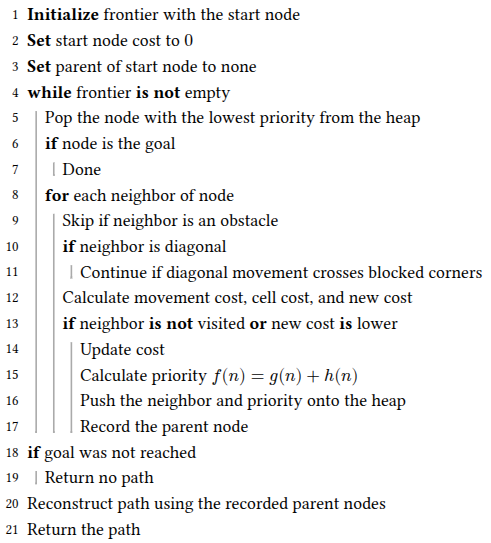
<p>I was incredibly boring and about as basic as I could be with my solution for the hero’s planner. It was noticed that most enemies turn into static obstacles fairly early in the simulation when the coverage is set to 20%. However there was the odd simulation or two where obstacles were generated in a way that an enemy had a direct path to the hero. Implementing a costmap later on helped reduce the amount of hero deaths.</p>

<div align="center">
  <img src="../assets/images/flatland/psuedocode.png" alt="A star algorithm psuedocode" />
</div>
<p style="text-align: center;"><strong>Figure 2:</strong> A* Psuedocode</p>

<p>The key A* priority is $f(n) = g(n) + h(n)$, where $g(n)$ is the accumulated cost of reaching the current cell, including both movement and cell costs, and $h(n)$ is the Euclidean distance from the current cell to the goal. The node with the lowest $f(n)$ value is selected next, balancing the cost already incurred with the estimated cost of reaching the goal.</p>

<h3 id="diagonal-wall-condition">Diagonal Wall Condition</h3>
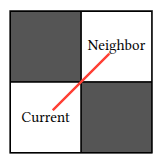
<p>One thing that was noticed and led to the pseudocode step “Continue if diagonal movement crosses blocked corners” after testing out the planner for the first time was how the hero would cut between two diagonal obstacles. In my opinion, if two obstacles (<code class="language-plaintext highlighter-rouge">grid[cell] == 100</code>) are diagonal, there should not be a way to pass through that wall to the open diagonal cell.</p>

<div align="center">
  <img src="../assets/images/flatland/diagonal_wall.png" alt="diagonal wall condition" />
</div>

<p style="text-align: center;"><strong>Figure 3:</strong> Example of a "diagonal wall".</p>

<p>In order to resolve this bug, an additional check was added into the planner code to make sure the neighboring cells to a diagonal move were not obstacles. The code snippet below shows the python implementation of this logic.</p>

<div class="language-py highlighter-rouge"><div class="highlight"><pre class="highlight"><code>  <span class="n">row_change</span> <span class="o">=</span> <span class="n">neighbor</span><span class="p">[</span><span class="mi">0</span><span class="p">]</span> <span class="o">-</span> <span class="n">current</span><span class="p">[</span><span class="mi">0</span><span class="p">]</span>
  <span class="n">column_change</span> <span class="o">=</span> <span class="n">neighbor</span><span class="p">[</span><span class="mi">1</span><span class="p">]</span> <span class="o">-</span> <span class="n">current</span><span class="p">[</span><span class="mi">1</span><span class="p">]</span>
  <span class="n">is_diagonal</span> <span class="o">=</span> <span class="n">row_change</span> <span class="o">!=</span> <span class="mi">0</span> <span class="ow">and</span> <span class="n">column_change</span> <span class="o">!=</span> <span class="mi">0</span>

  <span class="k">if</span> <span class="n">is_diagonal</span><span class="p">:</span>
      <span class="n">vertical_blocked</span> <span class="o">=</span> <span class="n">np</span><span class="p">.</span><span class="n">isinf</span><span class="p">(</span><span class="n">grid</span><span class="p">[</span><span class="n">current</span><span class="p">[</span><span class="mi">0</span><span class="p">]</span> <span class="o">+</span> <span class="n">row_change</span><span class="p">,</span> <span class="n">current</span><span class="p">[</span><span class="mi">1</span><span class="p">]])</span>
      <span class="n">horizontal_blocked</span> <span class="o">=</span> <span class="n">np</span><span class="p">.</span><span class="n">isinf</span><span class="p">(</span><span class="n">grid</span><span class="p">[</span><span class="n">current</span><span class="p">[</span><span class="mi">0</span><span class="p">],</span> <span class="n">current</span><span class="p">[</span><span class="mi">1</span><span class="p">]</span> <span class="o">+</span> <span class="n">column_change</span><span class="p">])</span>

      <span class="k">if</span> <span class="n">vertical_blocked</span> <span class="ow">or</span> <span class="n">horizontal_blocked</span><span class="p">:</span>
          <span class="k">continue</span>
</code></pre></div></div>

<h3 id="costmap">Costmap</h3>
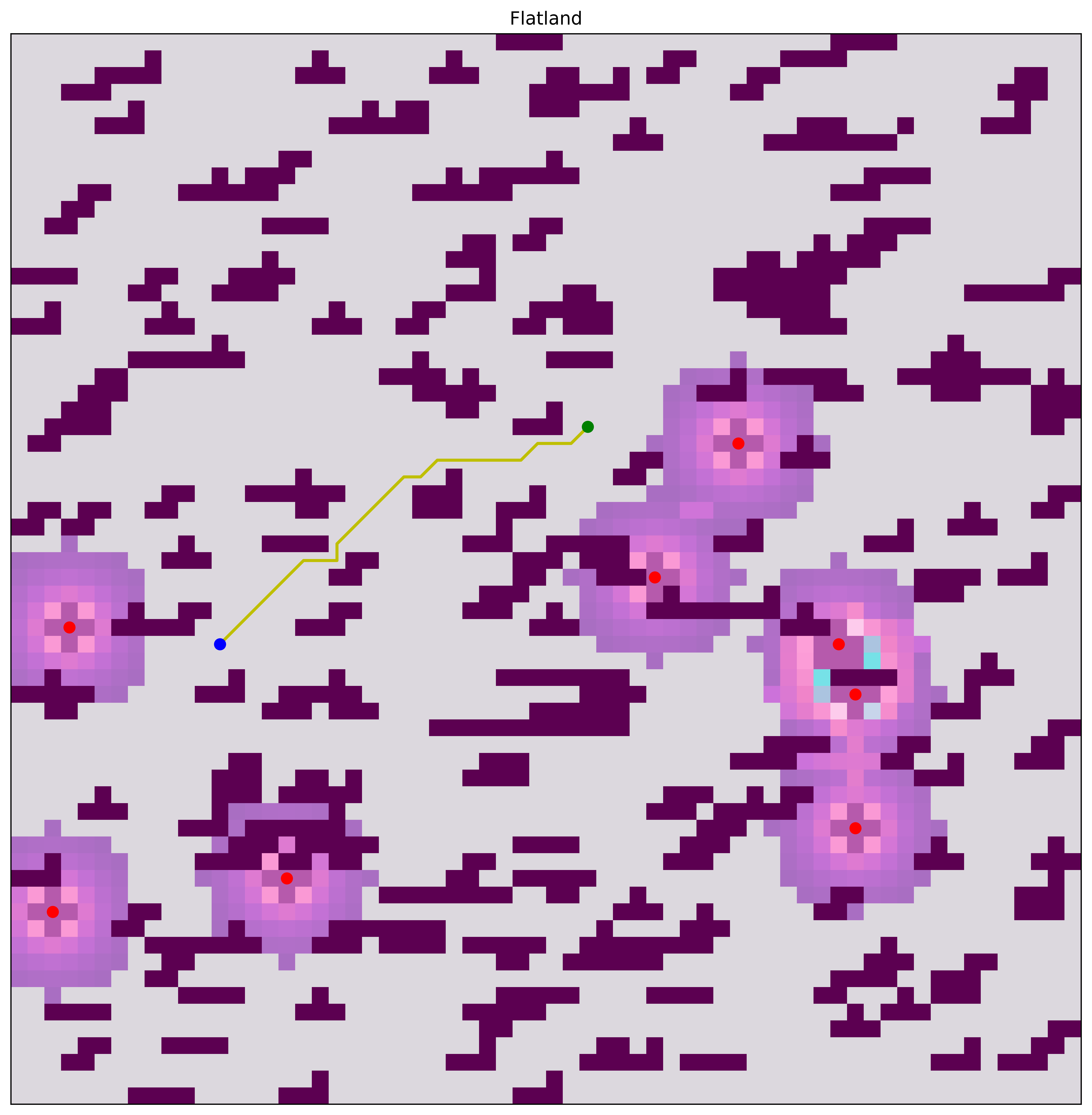
<p>In order to be victorious even in those few odd cases, A costmap was implemented to inform the hero of moves that are considered to be higher risk. This was done by making a second layer over the original map and increasing the cost of the cells that were within a specific radius of each enemy.</p>

<div align="center">
  <img src="../assets/images/flatland/flatland_2.png" alt="Enemies with areas of increased cost around them" />
</div>

<p style="text-align: center;"><strong>Figure 4:</strong> Enemies with areas of increased cost around them</p>

<p>As seen in the figure above, the areas surrounding enemies are colored in shades of purples and pinks (I took inspiration from the Navigation2 / Rviz2 color scheme). The closer a cell is to an enemy, the higher it’s cost is. In order to keep complete obstacle avoidance, all of the non-zero cells in the initial map are assigned a value of <code class="language-plaintext highlighter-rouge">np.inf</code>.</p>

<h3 id="rewrite-it-in-rust">“Rewrite it in Rust”</h3>
<p>Over the summer I was a software engineering intern (and now work there part-time) at a consulting company called Boston Engineering. During this time I worked on autonomous marine robots which all used the ROS Python client library (rclpy). After being there for a month or so, I was pulled on to another project which was a commercial internet of things (IoT) device whose codebase was being completely written in Rust. I had not written any Rust prior to that experience and then had to spend numerous hours completing the Rustlings tutorials, which led me to start using it for other small projects and later this assignment.</p>

<p>Conceptually, my Rust planner implementation is a translation of my Python one. It is just written in a compiled language instead of an interpreted one so the execution time is <em>much</em> faster. I also learned how to use Maturin and PyO3 to add python bindings into my Rust code so I could reuse my simulation environment and not have to rewrite anything.</p>

<div align="center">
  <img src="../assets/images/flatland/execution_time_report.png" alt="Time of execution for Rust and Python A*" />
</div>
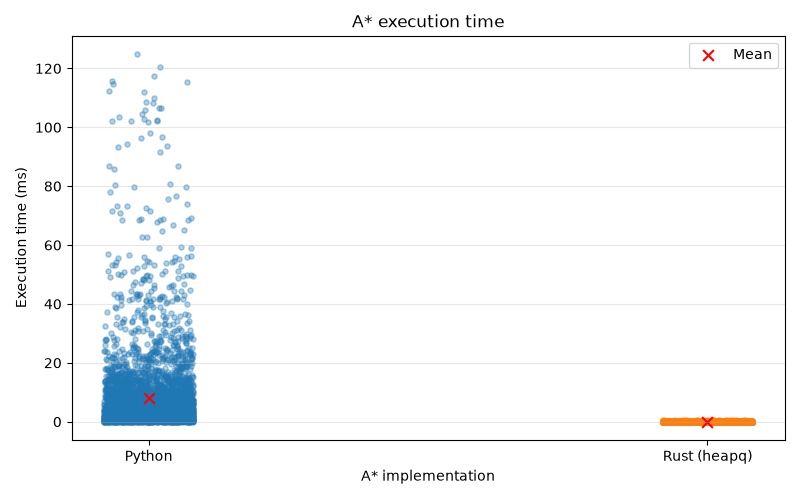
<p style="text-align: center;"><strong>Figure 5:</strong> Execution time for Python and Rust planners</p>

<table style="margin: 0 auto; display: table; width: auto;">
  <thead>
    <tr>
      <th style="text-align: left">Version</th>
      <th style="text-align: right">N</th>
      <th style="text-align: right">Mean (ms)</th>
      <th style="text-align: right">Median (ms)</th>
      <th style="text-align: right">Min (ms)</th>
      <th style="text-align: right">Max (ms)</th>
      <th style="text-align: right">Std dev (ms)</th>
    </tr>
  </thead>
  <tbody>
    <tr>
      <td style="text-align: left">Python</td>
      <td style="text-align: right">4144</td>
      <td style="text-align: right">7.9358</td>
      <td style="text-align: right">3.4891</td>
      <td style="text-align: right">0.0237</td>
      <td style="text-align: right">124.9164</td>
      <td style="text-align: right">13.6360</td>
    </tr>
    <tr>
      <td style="text-align: left">Rust (heapq)</td>
      <td style="text-align: right">4144</td>
      <td style="text-align: right">0.0430</td>
      <td style="text-align: right">0.0214</td>
      <td style="text-align: right">0.0036</td>
      <td style="text-align: right">0.7112</td>
      <td style="text-align: right">0.0650</td>
    </tr>
  </tbody>
</table>
<p style="text-align: center;"><strong>Table 3:</strong> Statistics for both planner implementations</p>

<p>In order to get the data to make both of the plots above, I ran 100 trials of each planner at 20% obstacle coverage, iterating through random seeds so that each planner would be tested in the same 100 environments. It is no surprise that Rust is much faster than Python due to how one is an interpreted language and the other is complied. I find it very interesting (although it was somewhat expected) that Python’s slowest path (124ms) took nearly 17,700% longer than Rust’s (0.7ms). One test I did not have time to do was compare different versions of the Rust implementation. When I complied the rust part of the project, I had to use a <code class="language-plaintext highlighter-rouge">--release</code> flag to specify that I wanted the result to be optimized. I wonder how unoptimized Rust would stack up against Python.</p>

<p>There are slight technical differences with the data structures used in the Rust algorithm and how popping and inserting nodes works. Similarities of the two planners include the algorithm itself, heuristics, movement, cell costs, how infinite cells are interpreted and being aware of the diagonal wall condition.</p>

<table style="margin: 0 auto; display: table; width: auto;">
  <thead>
    <tr>
      <th>Feature</th>
      <th>Python</th>
      <th>Rust</th>
    </tr>
  </thead>
  <tbody>
    <tr>
      <td><strong>Priority queue</strong></td>
      <td><code class="language-plaintext highlighter-rouge">heapq</code></td>
      <td><code class="language-plaintext highlighter-rouge">PriorityQueue</code></td>
    </tr>
    <tr>
      <td><strong>Cost storage</strong></td>
      <td>Dictionary</td>
      <td>Vector</td>
    </tr>
    <tr>
      <td><strong>Parent storage</strong></td>
      <td>Dictionary</td>
      <td>Vector</td>
    </tr>
    <tr>
      <td><strong>Closed set</strong></td>
      <td>No explicit set</td>
      <td>Yes</td>
    </tr>
    <tr>
      <td><strong>Grid indexing</strong></td>
      <td><code class="language-plaintext highlighter-rouge">(row, col)</code> dictionary keys</td>
      <td>Flattened array index</td>
    </tr>
    <tr>
      <td><strong>Bounds checking</strong></td>
      <td>Mostly implicit</td>
      <td>Explicit</td>
    </tr>
    <tr>
      <td><strong>Python integration</strong></td>
      <td>Native</td>
      <td>PyO3</td>
    </tr>
  </tbody>
</table>
<p style="text-align: center;"><strong>Table 4:</strong> Python vs. Rust A* implementation details</p>

<p>The main difference is that I ended up using <code class="language-plaintext highlighter-rouge">heapq</code> in the python version while using <code class="language-plaintext highlighter-rouge">PriorityQueue</code> for the Rust algorithm. They do fundamentally the same thing, but require different uses of data structures.</p>

<p>For example, in Python, I directly store the priority as shown below:</p>
<div class="language-py highlighter-rouge"><div class="highlight"><pre class="highlight"><code><span class="n">heapq</span><span class="p">.</span><span class="n">heappush</span><span class="p">(</span><span class="n">frontier</span><span class="p">,</span> <span class="p">(</span><span class="n">priority</span><span class="p">,</span> <span class="n">neighbor</span><span class="p">))</span>
</code></pre></div></div>

<p>In the Rust function, the priority is associated with each grid cell (node) through the scoring function:</p>
<div class="language-rs highlighter-rouge"><div class="highlight"><pre class="highlight"><code><span class="k">let</span> <span class="n">min_heap_score</span> <span class="o">=</span> <span class="nn">Box</span><span class="p">::</span><span class="nf">new</span><span class="p">(</span><span class="k">move</span> <span class="p">|</span><span class="n">node</span><span class="p">:</span> <span class="o">&amp;</span><span class="n">Node</span><span class="p">|</span> <span class="p">{</span>
    <span class="nf">Reverse</span><span class="p">(</span><span class="nf">OrderedFloat</span><span class="p">(</span><span class="n">node</span><span class="py">.f_cost</span><span class="p">))</span>
<span class="p">});</span>
</code></pre></div></div>

<h2 id="results">Results</h2>
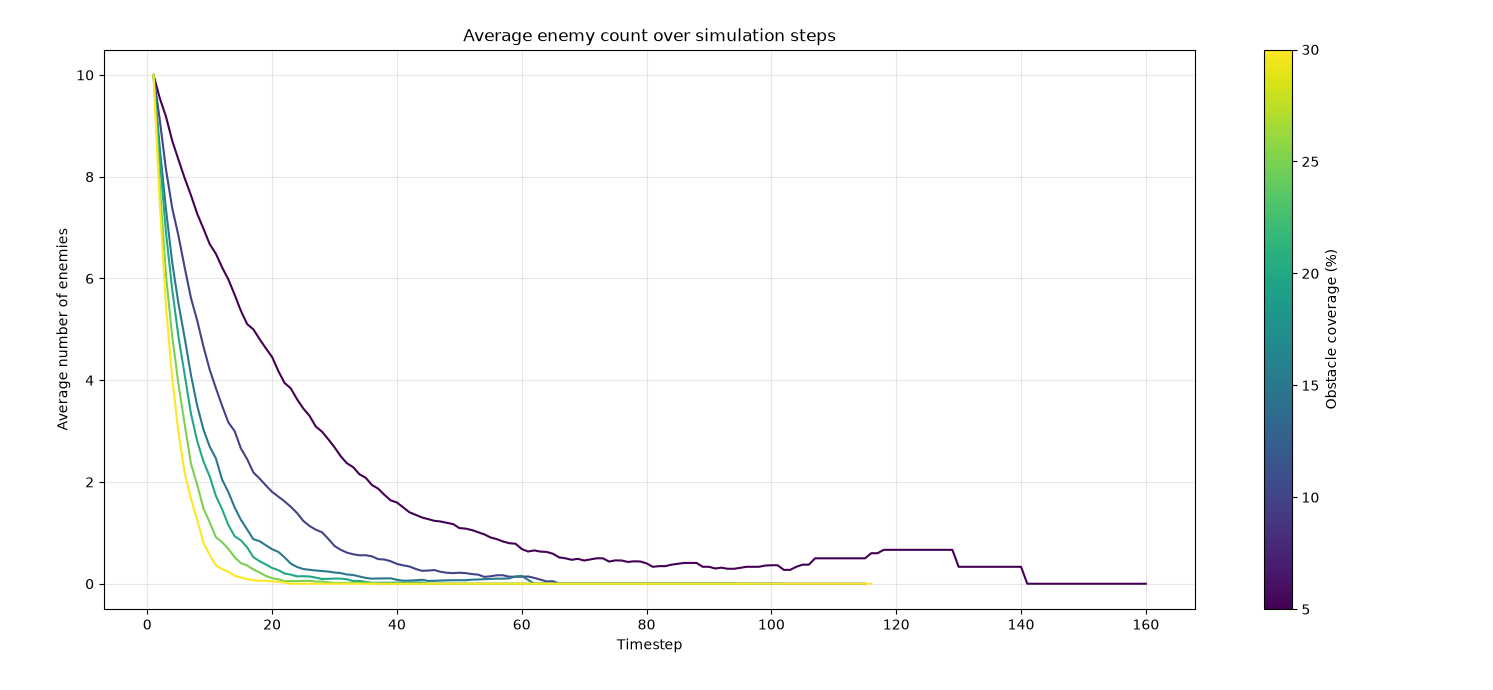
<p>It was noted pretty early on the the enemies were not very good at defeating the hero at 20% obstacle coverage. I was curious how obstacle coverage effected how many time steps enemies stuck around to challenge the hero point robot. In the future, I think it would be interesting to make the enemies a little bit smarter and see how the numbers change. All trials run were run using a data generation script (<code class="language-plaintext highlighter-rouge">trials.py</code>) and logging system I built (<code class="language-plaintext highlighter-rouge">game_logger.py</code>) which stores the game state in a JSON string until it is ready to be visualized by a function in <code class="language-plaintext highlighter-rouge">plotting.py</code>.</p>

<div align="center">
  <img src="../assets/images/flatland/enemy_count.png" alt="Enemies per timestep plot" />
</div>
<p style="text-align: center;"><strong>Figure 6:</strong> Number of enemies per timestep</p>

<div align="center">
  <img src="../assets/images/flatland/teleports.png" alt="Average teleports at different coverages" />
</div>
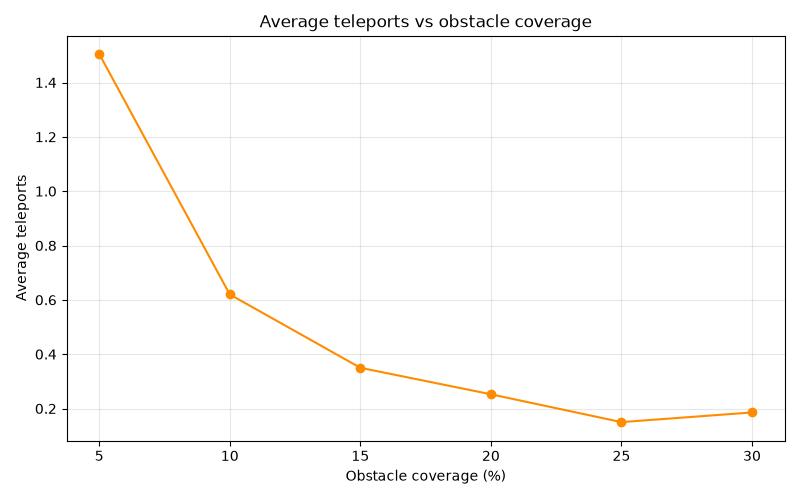
<p style="text-align: center;"><strong>Figure 7:</strong> Average number of teleports used in 100 games per percent coverage</p>

<p>It makes sense that less teleports would be needed as the coverage increases since enemies do not last as long in Flatland games with a higher percent obstacle coverage.</p>

<h2 id="other-information">Other Information</h2>
<p>A table of the external libraries I used, links to my GitHub repository, and other cool things can be found in this section.</p>

<h3 id="source-code">Source Code</h3>
<p>Link to GitHub: <a href="https://github.com/kymadogg/flatland">kymadogg/flatland</a>. This time I also tagged my final version and made a release to avoid errors from appearing (i.e. me pushing code to main and forgetting it is not instantly graded).</p>

<h3 id="external-libraries">External Libraries</h3>
<p>A variety of external libraries were used to prevent me from developing my own graphics library among other things. I chose ones that I was already familiar with in order to get the environment up quickly so I could focus on the implementation of the hero and enemy behavior.</p>

<h3 id="python">Python</h3>
<ul>
  <li><em><a href="https://numpy.org/">NumPy</a></em> - Numerical arrays, random generation, and grid data.</li>
  <li><em><a href="https://matplotlib.org/">Matplotlib</a></em> - Game visualization and animation.</li>
  <li><em><a href="https://pypi.org/project/colorama/">Colorama</a></em> - Colored terminal output.</li>
  <li><em><a href="https://pypi.org/project/notify2/">Notify2</a></em> - Desktop notifications for trial runs.</li>
  <li><em><a href="https://pypi.org/project/dbus-python/">dbus-python</a></em> - D-Bus integration used by desktop notifications.</li>
  <li><em><a href="https://www.maturin.rs/">Maturin</a></em> - Builds and installs the Rust-based Python extension.</li>
</ul>

<h3 id="rust">Rust</h3>
<ul>
  <li><em><a href="https://pyo3.rs/">PyO3</a></em> - Creates Python bindings for the Rust (<code class="language-plaintext highlighter-rouge">src/planner.rs</code>) code.</li>
  <li><em><a href="https://github.com/PyO3/rust-numpy">rust-numpy</a></em> - Accesses NumPy arrays from Rust.</li>
  <li><em><a href="https://crates.io/crates/ordered-float">ordered-float</a></em> - Provides ordering for floating-point values in the priority queue.</li>
  <li><em><a href="https://crates.io/crates/heapq">heapq</a></em> - Priority queue implementation for the Rust A* planner.</li>
</ul>]]></content><author><name>K Herbstzuber</name></author><category term="WPI RBE" /><category term="robotics" /><category term="motion planning" /><category term="RBE550" /><summary type="html"><![CDATA[Flatland is a 2D simulation where a point robot hero must navigate a randomly generated grid world and reach a goal point without being defeated by enemies.]]></summary></entry><entry><title type="html">How to train a YOLO model</title><link href="https://kymadogg.github.io/yolo-model/" rel="alternate" type="text/html" title="How to train a YOLO model" /><published>2026-10-07T00:00:00+00:00</published><updated>2026-10-07T00:00:00+00:00</updated><id>https://kymadogg.github.io/yolo-model</id><content type="html" xml:base="https://kymadogg.github.io/yolo-model/"><![CDATA[<p>How to use Robolytics, YOLO and other tools to build your own model.</p>]]></content><author><name>K Herbstzuber</name></author><category term="Tutorials" /><category term="robotics" /><category term="guide" /><category term="computer vision" /><summary type="html"><![CDATA[How to use Robolytics, YOLO and other tools to build your own model.]]></summary></entry><entry><title type="html">Localization using a Webcam</title><link href="https://kymadogg.github.io/visual-localization/" rel="alternate" type="text/html" title="Localization using a Webcam" /><published>2026-05-10T00:00:00+00:00</published><updated>2026-05-10T00:00:00+00:00</updated><id>https://kymadogg.github.io/visual-localization</id><content type="html" xml:base="https://kymadogg.github.io/visual-localization/"><![CDATA[<p>So what if you are a robot attemping to navigate an environment where lidar is practically useless, but your odometry is not the greatest? This is where vison based localization comes in.</p>]]></content><author><name>K Herbstzuber</name></author><category term="Side Quests" /><category term="robotics" /><category term="hackathoned" /><summary type="html"><![CDATA[So what if you are a robot attemping to navigate an environment where lidar is practically useless, but your odometry is not the greatest? This is where vison based localization comes in.]]></summary></entry></feed>